
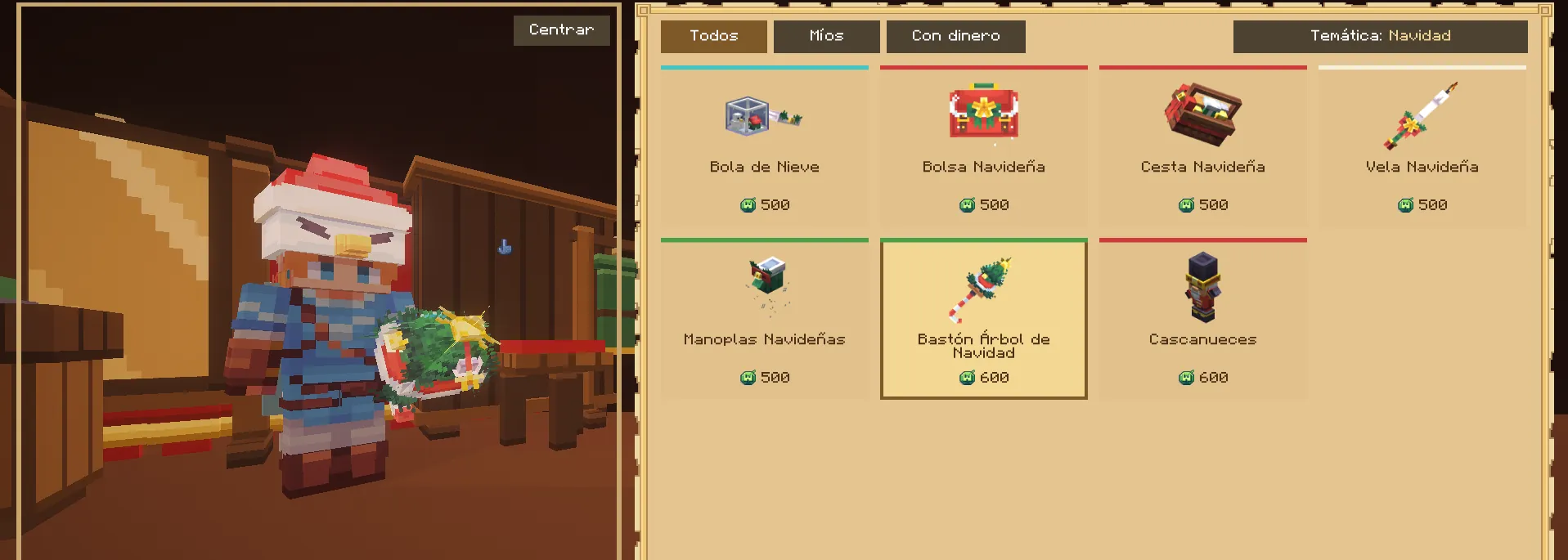
The wardrobe
opens the wardrobe: on the left, a mannequin with your look; on the right, the pieces by tab. There are hats, back pieces, balloons, off-hand items, auras, armour and emotes.
The first time it asks you to click the mannequin's head, to centre it for your screen; the Centre button repeats it. The mouse wheel over the mannequin turns it, and anywhere else turns the page.
Try before you spend
Choosing a card puts the piece on the mannequin, without buying or equipping it. You can combine several to see the outfit, and clicking the same one again removes it. Emotes can be tried too: the mannequin dances them.
When you close the menu the try-ons vanish and you are back in what you wore.
Buying, renting and gifting
Pieces are paid with WildBucks, and some also with OverCoins: they are two alternative prices, not a sum. Buying takes two clicks, or pressing Space twice, so you never buy by mistake.
Some pieces can be rented for a while or gifted to another player, always with WildBucks. Pieces are grouped into collections, such as Christmas, Halloween, Fishing or Miner, which you can use as a filter.
Emotes
opens your emotes. When you play one, the menu closes and your character does it for real, for everyone to see. They cannot be used in combat.
Emotes are bought in the wardrobe, and some store ranks include them.